- AM5 with DDR5 and B650/B850/X670/X870 chipsets is the best current base for a scalable AMD gaming PC.
- The X870E/X670E chipsets offer more PCIe, M.2 and USB4, while the B650/B850 balance price and performance.
- PCIe 4.0 and NVMe M.2 SSDs are sufficient for gaming; PCIe 5.0 and USB4 are of interest mainly in enthusiast ranges.
- A good VRM, modern network connectivity, and sufficient USB ports make a bigger difference to the experience than minor overclocking.
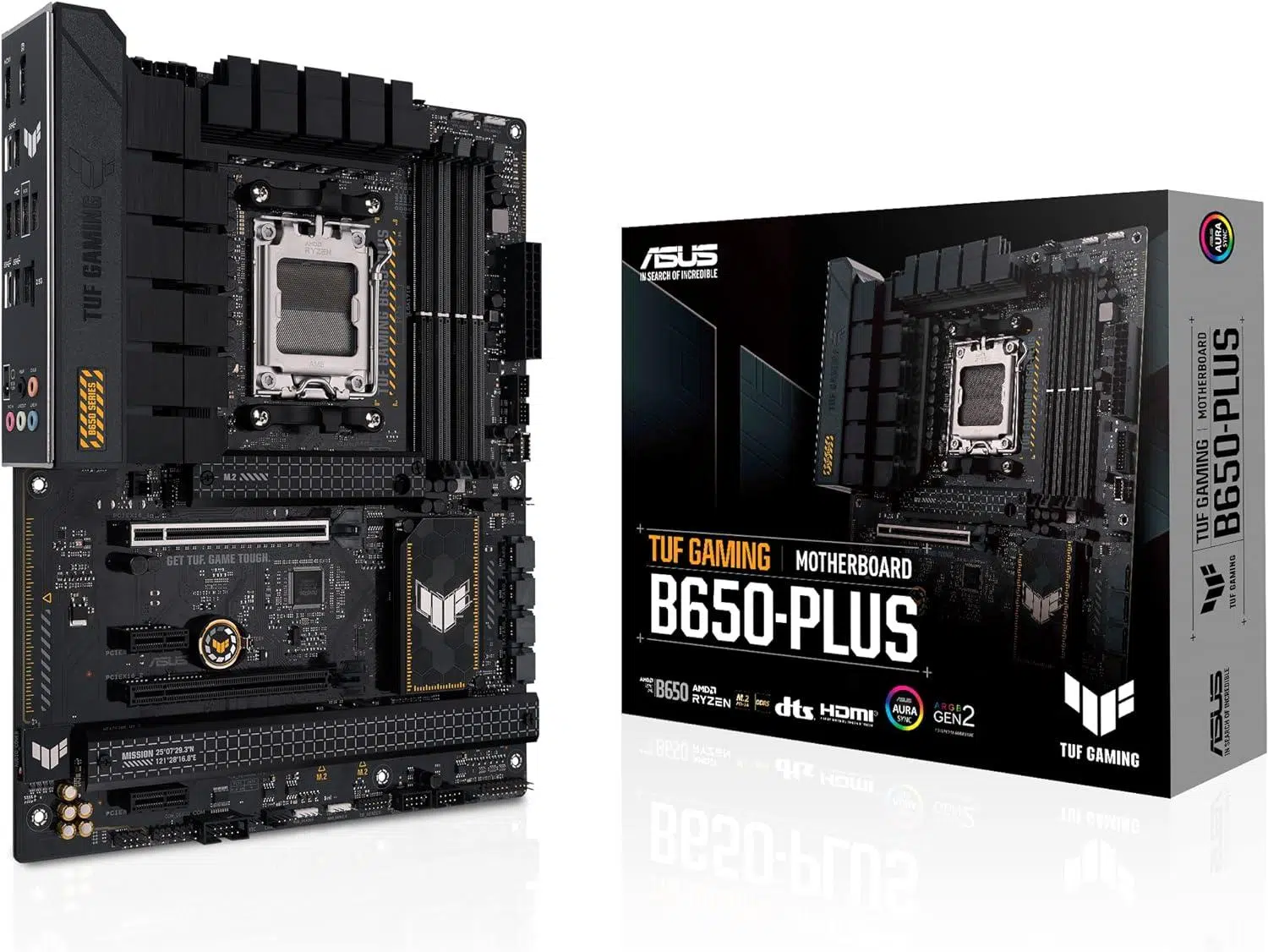
If you're building a gaming PC with an AMD processor and you've started looking at motherboards, it's very easy to get lost among them. including model, chipset, sockets, and unusual acronymsThe good news is that the market is very mature: almost all modern motherboards are solid, but choosing well makes a difference in connectivity, lifespan, and expansion possibilities.
In this guide you will find everything you need to know about AMD gaming motherboardsThis guide covers exactly what an AMD motherboard is, which sockets and chipsets are best for gaming, how AM5 compares to AM4, the different motherboard form factors, what to look for in terms of RAM, PCIe, M.2, USB, networking, audio, overclocking, and which chipset ranges best suit your budget. It's a comprehensive overview, but it will help you understand what's worth spending your money on... and what isn't.
What is an AMD motherboard and why is it so important?
The motherboard, also called motherboardThe motherboard is the main circuit board where the processor, RAM, graphics card, storage drives, and virtually all PC components are connected. In the case of AMD, motherboards are designed around a socket specific (AM4 or AM5 (DDR5)) and a chipset that determines much of the connectivity.
In modern generations, many functions that previously depended on the chipset (such as the memory control or part of the PCI Express connectivityThese are handled by the processor itself. This means that, within the same range, the differences between motherboards are more focused on power quality (VRM), number and type of ports, M.2 slots, fast USB ports, network, audio, Wi-Fi, etc.
If you're going to build a powerful gaming PC with AMD Ryzen, especially if you're aiming for models with 3D V-Cache (X3D) For the latest Ryzen 7000/8000/9000 generations, the motherboard will determine:
- What processors will you be able to install today and in the future?.
- How much DDR5 RAM and what speed you will be able to use.
- Whether you will have it or not PCIe 5.0 for graphics card and SSD.
- Number fast M.2 NVMe slots for storage.
- The presence of Wi-Fi 6E or Wi-Fi 7, 2.5/5/10 GbE and USB4.
AMD sockets for gaming: AM4 vs AM5
Currently, two major AMD consumer platforms coexist: AM4 (DDR4) and AM5 (DDR5)The gaming motherboards you'll find are based on one of these two sockets.
Socket AM4 It was the leading platform for years, compatible with Ryzen 1000, 2000, 3000, 4000G, and 5000 series processors. It uses DDR4 memory and supported chipsets such as the A520, B450, B550, and X570/X570S. It remains a very viable option if you already own a good Ryzen 3000/5000 series processor or if you find a compatible combo. Cheap Ryzen 5000 + B550But it's a platform that's no longer growing.
Socket AM5 It is the present and future of AMD: it uses exclusively memory DDR5 and supports Ryzen 7000, 8000G and 9000 (Zen 4 and Zen 5). It's the logical choice if you're building a new mid-range or high-end gaming PC because it offers:
- PCIe 5.0 in graphics card and/or SSD in many models.
- Compatibility assured with EXPO (AMD memory profiles).
- Better support for Wi-Fi 6E/7, USB4 and 2.5-10 GbE.
- Longest update path within the same socket.
If you're starting from scratch and your priority is to play, a good choice is a sensible one. AM5 motherboard with mid-range or high-end chipsets (B650/B650E, B850, X670/X670E, X870/X870E). AM4 only makes sense to reuse existing components or if you find very aggressive deals on Ryzen 5000, especially the 5800X3D.
AMD chipsets for AM5 gaming boards
Within the AM5 socket, AMD offers several chipsets designed for different budgets and uses. Understanding what each one offers will prevent you from overpaying or falling short.
The logic is simple: the chipsets of the series X They are high-end (more PCIe lanes, more M.2, more USB, more oriented towards overclocking and top connectivity), those of the series B They are a very well-balanced mid-range and the A620 It's basic input.
AMD X870E and X870: High-end for enthusiasts
The chipsets X870E y X870 They are the current top-of-the-line AM5 motherboards. They are designed for high-end and very high-end systems, with powerful graphics cards, multiple NVMe SSDs, and high-resolution/refresh-rate monitors.
On a good X870E/X870 motherboard you will find:
- Full support for CPU and RAM overclocking.
- To 24 PCIe 5.0 lanes from the CPU (graphics graphics card + SSD).
- Between 12 PCIe 4.0 lanes and 8 PCIe 3.0 lanes from the chipset (X870E has more).
- Others M.2 PCIe 5.0 slots for ultra-high-performance SSDs.
- Abundant ports USB 3.2 Gen2 and Gen2x2and in many models USB4.
- LAN at least 2.5GbEwith many 5GbE or even 10GbE models.
- Wi-Fi 6E or directly Wi-Fi 7 on virtually all gaming motherboards.
- Heavily oversized VRMs, designed for High-end Ryzen 9 and X3D low OC.
Boards such as the ASUS ROG Crosshair X870E, MSI MEG / MPG X870E, Gigabyte X870E AORUS or the ASUS ProArt X870E-Creator are examples of models with almost no cuts in connectivity: USB4, multiple M.2 PCIe 5.0 slots, high-end audio, dual LAN ports, Wi-Fi 7, LCD screens, on-board buttons and controls for overclocking, etc.
These are ideal solutions if you want to install or upgrade to processors like a Ryzen 9 9950X Or a 9900X with a high-end graphics card and you don't want to worry about VRM or port limitations for years.
AMD B850 and B840: modern mid-range on AM5
The series B850 It's the most sensible mid-to-high-end option for most gaming PCs with Ryzen 7000/8000/9000 series processors. It offers virtually everything a gamer needs, but at a more affordable price than the X870.
A good B850 usually includes:
- CPU and RAM overclocking enabled.
- 24 PCIe lanes from the CPU, but typically limited to PCIe 4.0.
- PCIe and M.2 slots with at least one slot PCIe 5.0 for SSD and another 4.0.
- Support up to X with very high frequencies (8000+ MT/s according to the nameplate).
- Multiple USB 3.2 Gen2 ports and some front or rear Gen2x2 ports.
- 2.5 GbE LAN and in many cases Wi-Fi 6E or Wi-Fi 7.
The key is that you sacrifice some maximum connectivity compared to the X870E (fewer PCIe lanes from the chipset, fewer USB ports, and often no USB4), but you still have a perfect machine for a powerful graphics card + several NVMe 4.0/5.0 SSDsPlates like the MSI MAG B850 Tomahawk Max, ASUS TUF / ROG Strix B850 or Gigabyte B850 AORUS are very balanced.
Chipset B840 It's a scaled-down option aimed at more affordable computers or office/studio PCs that want AM5 but without frills:
- It does not allow CPU overclock (yes, RAM to a certain extent).
- The CPU's PCIe lanes remain in Gen4.
- Fewer high-speed USB ports and no USB4.
- VRM is generally simpler, but sufficient for Ryzen 5 and Ryzen 7 without the crazy stuff.
Motherboards like the MSI B840 Gaming Plus or ASUS Prime B840M-A-CSM are perfect candidates for a mid-range gaming PC, where price is prioritized but you still want to enjoy DDR5 and the current platform.
AMD B650 / B650E and X670 / X670E: the first batch of AM5
The chipsets B650/B650E y X670/X670E They were the first to arrive on AM5 and are still a very valid option, especially now that their prices have dropped compared to the new X870/B850.
With B650/B650E you have:
- DDR5 support with profiles EXPO.
- One or more slots M.2 PCIe 4.0, and in the B650E versions at least one PCIe 5.0.
- PCIe x16 4.0 slot for the graphics card (or 5.0 in E).
- CPU and RAM overclocking available.
- Modern connectivity: USB 3.2 Gen2, some Gen2x2, 2.5 GbE and Wi-Fi 6/6E in many models.
The X670/X670E raises the bar with more PCIe lanes, more M.2 slots, and more USB ports, aimed at those who want something more enthusiast-oriented without paying the price of an X870E. Many current X670E motherboards have dropped to the range of mid-high range And they're a very smart buy if you find a good deal.
A620: entry-level range for tight budgets
Chipset A620 It is the most basic entry point to AM5: it is designed for devices with Ryzen 5 or Ryzen 8000G APUs mid-range and for those who want to spend as little as possible on the cooktop.
In exchange for the low price, you give up:
- CPU overclocking.
- PCIe 5.0 on graphics card/SSD (you stay on PCIe 4.0).
- Large number of fast USB ports and M.2 slots.
- VRM more than enough for very power-hungry processors.
If you're on a tight budget but want to get into DDR5 and AM5, a good A620 Combined with a Ryzen 5 and a mid-range graphics card, it can work perfectly for playing games at 1080p/1440p without any need for extreme upgrades.
AMD AM4 chipsets that are still worth it
The AM4 platform is already in its final stages, but it remains present in many gaming setups for one reason: it offers very good value for moneyespecially with Ryzen 5000 and DDR4 memory that you may already have.
The main chipsets for gaming on AM4 are:
- B550: the star option for Ryzen 3000/5000.
- X570/X570S: high-end with more PCIe 4.0.
- A520: low-cost entry without PCIe 4.0.
B550 provides access to:
- A slot PCIe 4.0 x16 for the graph.
- A slot M.2 PCIe 4.0 direct to CPU for SSD.
- Remaining PCIe 3.0 connectivity from the chipset.
- Fast DDR4 (up to 4400-4800 MT/s depending on motherboard).
- Full overclocking across the entire Ryzen range.
With X570 You gain more PCIe 4.0 lanes, more M.2 slots, and more USB ports, but for a typical gaming PC, a good B550 motherboard is almost always more cost-effective. X570 motherboards make sense if you need many PCIe 4.0 expansion cards or several very fast NVMe 4.0 SSDs in parallel.
Motherboard form factors for an AMD gaming PC
Besides the chipset, the other big factor is the physical format of the platewhich will determine the size of the box, the expandability and, in part, the price.
In domestic settings, the most common formats are:
- ATX (305 × 244 mm): The classic standard. More PCIe slots, more space for VRMs and heatsinks, more fan headers, more M.2 slots. Ideal for mid-tower or tower cases and gaming builds where you want to expand.
- Micro-ATX (244 × 244 mm): somewhat more compact, usually with fewer physical PCIe slots, but almost always maintaining 4 RAM banks and several M.2 slots. It is usually somewhat cheaper and sufficient for most users.
- Mini-ITX (170 x 170 mm): Very compact motherboards for small PCs under 20 liters, perfect for HTPCs or mini-ITX gaming rigs. They only have two RAM slots and a single PCIe x16 slot, and fewer M.2 slots, but nowadays they offer performance very close to ATX at the cost of a higher price.
Larger sizes also exist (E-ATX, XL-ATXThese are designed for builds with many graphics cards, aggressive custom liquid cooling, multiple controllers, etc. For normal gaming, ATX or even micro-ATX makes the most sense.
DDR5 and DDR4 RAM on AMD motherboards
In AM5 all license plates exclusively and mandatorily use DDR5In AM4, however, there is only DDR4No motherboards support both standards simultaneously, so your choice of platform determines the type of RAM.
Modern AM5 motherboards typically support DDR5:
- To 256 GB in four UDIMM slots.
- Speeds from 4800 MT/s (JEDEC) up to more than 8000 MT/s in OC with EXPO or XMP 3.0.
- Dual channel configurations, with frequency variations depending on whether you use 1 or 2 modules per channel and whether they are single or dual rank.
AMD has introduced the technology EXPOEXPO is a memory profiling standard optimized for Ryzen, allowing you to automatically load frequencies and latencies higher than the official JEDEC specifications without having to mess around in the BIOS. Almost all AM5 motherboards support EXPO and these profiles. Intel XMP 3.0.
In practice, with very popular gaming processors like the Ryzen 7/9 X3DA combination of moderate frequency and adjusted latencies usually works best, for example DDR5-6000 CL26-CL30, which are extremely fast kits with very low latencies.
Integrated graphics and video outputs
Almost all desktop Ryzen 7000, 8000, and 9000 series processors include integrated graphicsThey're not beasts for playing the latest games, but they're perfectly adequate for office work, multimedia, and for starting up your PC without a dedicated graphics card if your main GPU ever breaks down.
That's why it's important that the motherboard offers at least one video output, usually:
- HDMI 2.1: allows 4K at 60 Hz (and even 8K at 30 Hz) depending on implementation.
- DisplayPort 1.4: something more capable, with 4K at 120 Hz and 8K at 60 Hz, and very versatile for adapters.
- USB-C with DisplayPort Alt Mode: present on motherboards with USB4; combines data, video and power (up to 15W) through a single cable, ideal for laptop-type docks.
If you're going to build a Ryzen with powerful integrated graphics (APU) And if you don't plan on using a dedicated graphics card for a while, it's a good idea to choose a motherboard with multiple video outputs (HDMI + DP) so you're not limited to a single monitor.
PCIe expansion slots and graphics cards
PCI Express connectivity is one of the key points to consider when evaluating a gaming motherboard, especially if you plan to install a powerful GPU and several NVMe SSDs.
In AM5 the current situation is:
- The Ryzen 7000/9000 CPUs offer support for PCIe 5.0 (graphics graphics card and SSD).
- The Ryzen 8000G APUs remain in PCIe 4.0 from the CPU.
- Depending on the chipset and the manufacturer's design, some motherboards have PCIe 5.0 only on the GPU slot, others on one or more M.2 slots, and some on both.
For a standard gaming build, the reasonable thing to do is:
- One main slot reinforced PCIe x16 (with metal armor) for the graph.
- Among 2 and 4 M.2 NVMe slots (PCIe 4.0 and/or 5.0) for SSD.
- Some PCIe x1 Free if you want to add dedicated sound cards, capture cards, extra controllers, etc.
That the graphics card slot is PCIe 5.0 or 4.0 It makes virtually no difference in real-world performance these days, even for top-tier GPUs. PCIe 5.0 is most noticeable in high-end SSDs, and even then, for pure gaming, a good PCIe 4.0 SSD is more than enough.
Storage: M.2 NVMe and SATA
On modern AMD motherboards, storage is simpler than ever. Typically, all M.2 slots are NVMe PCIe and, at most, some may also accept SATA drives in the same connector.
The types of SSDs you'll find:
- M.2 PCIe 5.0 x4Theoretical speeds of around 16 GB/s, with current drives operating at 10-14 GB/s in real-world use. They are very fast but also consume more power and generate more heat, which is why top-of-the-line motherboards usually include oversized heat sinks and sometimes small heatpipes.
- M.2 PCIe 4.0 x4Up to 8 GB/s theoretically, with actual SSD speeds between 5 and 7.5 GB/s. Today they are the Sweet spot in terms of performance/price ratio, and have made SATA obsolete for many uses.
- SATA III (2.5” or M.2 SATA): up to 600 MB/s. Still useful for cheap mass storage (HDD/SSD SATA).
In a modern gaming PC with Ryzen, a typical configuration would be:
- One SSD M.2 NVMe PCIe 4.0 or 5.0 for system, online games and applications.
- One or two SATA SSD/HDDs for large library of games, data and copies.
- Extra free M.2 slots in case you expand later without changing anything else.
USB ports and external connectivity
The motherboard acts as central port hub For all your equipment: mouse, keyboard, headphones, USB microphone, external hard drives, capture cards, controllers, webcam, etc. Not all USB devices are the same, and it's worth paying attention to the differences.
Today, the recommended motherboard for an AMD gaming PC should include:
- Others USB 3.2 Gen1 and Gen2 rear (5 and 10 Gbps).
- At least one USB 3.2 Gen2x2 (20 Gbps), ideal for external SSDs.
- In high-end models, one or two ports. USB4 (40 Gbps), especially useful if you use docks, monitors with USB-C or very fast storage.
- Internal header for Front USB-C in the box (Gen2 or Gen2x2).
USB4 is still reserved for mid-to-high-end and high-end motherboards (especially well-equipped X670E/X870E/B850 models). It's not essential for gaming, but it greatly increases versatility if you connect many powerful external peripherals.
Network: Ethernet and Wi-Fi for gaming
In terms of network connectivity, most decent modern AMD AM4/AM5 motherboards include at least one port Ethernet 2.5 GbEwhich is becoming the standard. In higher-end models you'll also see 5 GbE or 10 GbE for those who work with large volumes of data on a local network.
Regarding Wi-Fi:
- Current mid-range/high-end motherboards usually include Wi-Fi 6E or Wi-Fi 7.
- Wi-Fi 7 It allows channels up to 320 MHz and raw speeds close to 5-6 Gbps under ideal conditions, in addition to MLO (Multi-Link Operation) to use several bands at once.
- If your router and your environment do not take advantage of Wi-Fi 7, WiFi 6E It remains a very fast option and more than sufficient for most people.
Although for purely competitive play it is still preferable Ethernet cableHaving built-in Wi-Fi is very useful, and if you don't have it, you'll end up spending money on a PCIe card or a quality USB adapter.
Integrated audio and premium extras on gaming motherboards
Virtually all AMD gaming motherboards today come with more than decent integrated audio, with mid-high range Realtek chips (ALC1200, ALC1220, ALC4080/4082, etc.), isolated circuitry and support for surround sound.
In very high-end models you will see additions such as:
- Dedicated DACs from ESS or other manufacturers.
- High-quality audio capacitors and dual headphone amplifiers.
- S/PDIF optical outputs and special profiles for gaming.
It won't give you more FPS, but it can give you extra quality if you use mid-to-high-end headphones or decent speakers And you don't want to buy an external sound card. However, if you're a serious audiophile, a dedicated DAC/AMP is still the way to go.
Overclocking, VRM and motherboard cooling
El overclock On modern AMD platforms, it's fairly automated, and in many cases, pushing it too far doesn't compensate for the extra heat and power consumption. Even so, having a motherboard with a good VRM (voltage regulation module) is key to:
- Maintaining a stable High-end Ryzen 7/9 under prolonged load.
- Allow PBO profiles/Curve Optimizer or small manual overclocks without problems.
- Avoid VRM temperature throttling.
On serious gaming motherboards you'll see VRMs with many power phases (14, 16, 18, 20+), high-current MOSFETs (70-110A) and large aluminum heat sinksThe higher-end models also include temperature sensors, on-board buttons, POST displays, small LCD screens, etc.
If you don't plan on aggressive overclocking or installing a top-of-the-line Ryzen 9, there's no need to go to extremes, but it's a good idea to avoid very cheap motherboards with minimalist VRMs if your plan is to install a processor with many cores and play/stream. hours and hours.
Other characteristics to consider
In addition to all of the above, there are some details to consider to ensure the motherboard fits your PC usage style:
- Connector distributionEnsuring that the fan, USB, RGB, and power headers are properly positioned facilitates a clean assembly and improves airflow.
- ARGB and RGB HeadersIf you like lighting, check that the motherboard has enough addressable and 12V connectors for strips and fans.
- Compatibility with “back-connector” boxesSome newer motherboards place almost all connectors at the back to hide cables, but they require specific boxes.
- BIOS and softwareA clear BIOS with good memory profiles and easy updates (BIOS Flashback) is invaluable. Major manufacturers (ASUS, MSI, Gigabyte, ASRock) have significantly improved this aspect.
- TPM 2.0, Secure Boot and Windows 11 supportOn modern motherboards, it's covered either integrated or via firmware, so you won't have any problems installing the system.
If your goal is to build an AMD gaming PC that performs well today and will support you through several generations of graphics cards and SSDs, the smart thing to do is invest in a good foundation (motherboard + CPU + RAM) For AM5, choose a chipset that suits your actual needs (a well-chosen B850/B650E or X670E/X870E is usually the sweet spot) and avoid unnecessary frills. This way, you can enjoy your Ryzen with complete peace of mind, thanks to a stable, fast motherboard packed with connectivity. When it's time to upgrade your GPU or add more storage, it'll be as simple as screwing it in.