- Optimize habitats, irrigation, and construction to progress quickly and attract more Pokémon.
- Take advantage of special moves, Musgorlax, Tinkaton, and Castform to farm better.
- Explore Dream Islands, relics, and Mystery Gifts to obtain unique resources and items.
- Use Pokédex, multiplayer, and a photocopying machine to travel, clone, and complete collections.

If you've just landed in Pokémon Pokopia and feel overwhelmed by the game, don't worry: it's perfectly normal. It's a massive title, with countless systems and details that the game itself only partially explains, so it's incredibly easy to waste hours doing things inefficiently or without grasping the true potential of your Pokémon and the world.
In this guide, you'll find practical tips, advanced advice, and little secrets to help you get the most out of Game Freak's first exclusive spin-off for Nintendo Switch 2. From building better and faster to maximizing habitats, traveling between dream islands, cloning objects, and making the most of Musgorlax, Tinkaton, and the rest of the gang, here's a comprehensive collection of everything you need to know.
What is Pokémon Pokopia and how to approach your game
Pokémon Pokopia is a curious mix of life simulator, building, and adventure, with a feel reminiscent of Animal Crossing and Dragon Quest Builders, but filtered through a Pokémon lens. You control a human-like Ditto who helps Professor Tangrowth rebuild a shattered world , creating habitats, houses, and comfort zones for dozens of different species.
The beauty of it all lies in the fact that you don't just "catch" Pokémon, but rather convince them to live in your habitats, work alongside you , and become part of your little paradise. Each creature has unique tastes, needs, and abilities, and many of the important mechanics (terraforming, watering, plowing, breaking rocks, building faster…) depend on the special moves that Ditto learns from them.
From the beginning, it's important to understand that there's no need to rush : the game is designed to be progressed gradually, unlocking areas and systems, but if you know certain tricks you'll avoid hours of repetitive work, wasting resources, or missing out on entire features like Mystery Gifts, timed events, or advanced teleportation.
Pokopia Pokédex, Legendary Pokémon, and How to Expand Your Collection
The Pokédex not only records the species you see, but also serves as a tool for locating and traveling to them . From it, you can see where each Pokémon lives, what conditions its habitat requires, and, most interestingly, use a "hidden" teleportation function that many people overlook, which we'll explore later.
The Pokédex also includes a special section for Legendary and Mythical Pokémon . These often require very specific conditions: from highly specific and elaborate habitats to special events, Mystery Gifts, or even the use of certain unique items obtained through long quests. Before becoming obsessed with them, it's a good idea to master habitat management and the event system , as many are tied to specific dates or high levels of environmental satisfaction.
Pay attention to the descriptions, because the Pokédex gives you veiled clues about how to obtain each legendary Pokémon: weather, time of day, type of terrain, or even specific furniture that must be present in its area for it to appear.
Habitats: how to create, optimize and make the most of them
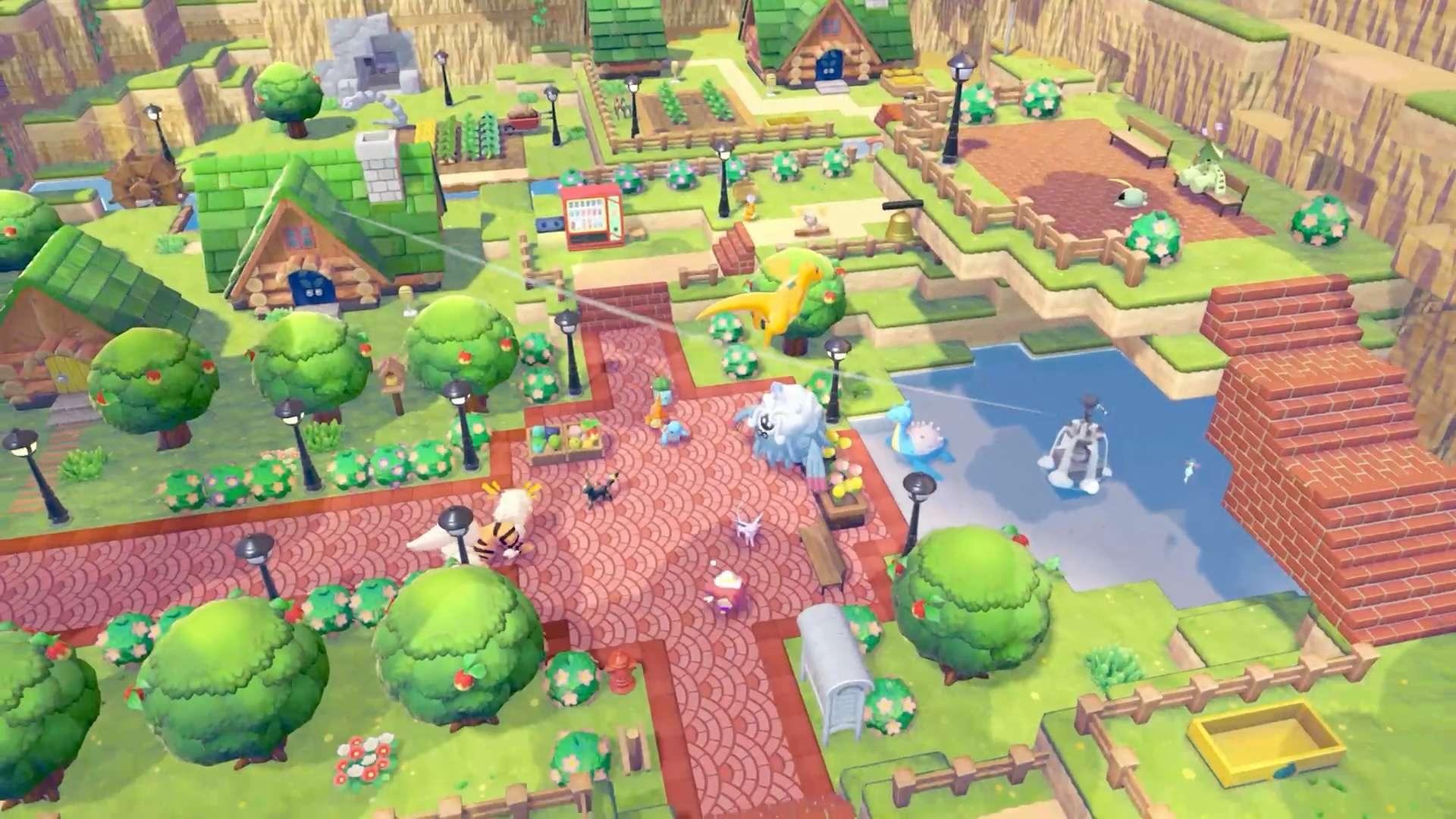
In Pokopia, each species has a preferred habitat that determines where it can appear and live. These habitats depend on terrain elements (grass, water, sand, rock, etc.), but also on objects and decorations : trees, flowers, specific furniture, appliances, and even strange things like washing machines.
To create a new habitat, the game gives you clues through missions and dialogues , but if you rush through, it can take a long time to unlock them all. A very efficient way to progress is to raise the level of each area's environment by improving the happiness of the Pokémon already living there. This unlocks additional rewards at the Pokémon Center, where you can purchase paid hints that reveal how to create new habitats and which Pokémon are hidden behind them.
A crucial detail: press the right stick and the game will show you the exact area that belongs to each habitat. This view is key to understanding where to place furniture and objects so they count within that zone. If you don't do this, you might be decorating outside the valid area without realizing it.
Furthermore, habitats can partially overlap . If two habitats share a portion of land and you place a piece of furniture in that shared area, that object will count for both. This is a very efficient way to increase the comfort level of several areas using fewer resources: a single washing machine, for example, can score points in two different habitats if it's located in the overlapping area.
Finally, to make the most of rare habitats, keep in mind that once one is full, it stops attracting new Pokémon. If a valuable species appears, move it to a house in another part of the map to free up space in the habitat for another new creature to move in.
Important requests and key missions
The so-called important requests are the missions that truly drive the story. They usually involve several Pokémon, ask you to build special structures, explore new areas, or solve puzzles using Ditto's abilities. They aren't just simple side quests: completing them unlocks special moves, transformations, habitats, and entire areas of the map.
Many lengthy requests are resolved in several phases and can seem a bit confusing if you don't follow a plan. It's best to complete them in parallel with expanding your base , not leaving them all until the end, because some unlock essential upgrades such as new irrigation methods, terraforming large areas, or faster construction speeds.
Some of the important missions are tied to specific Pokémon that need rescuing or assistance in particular areas, such as the famous case of the tunnel Onix , which, once freed, completely changes how you manage humidity and watering in the environment. If you skip these missions, you'll end up wasting time manually watering huge areas unnecessarily.
Ditto's special moves and useful transformations
During the adventure, Ditto can learn special moves from other Pokémon that serve more purposes than just combat. These are world abilities that allow you to perform actions such as tilling the soil, watering fields, breaking rocks, absorbing water, or even moving multiple blocks at once in a "creative mode" style.
Rock Smash is one of the first and most important abilities, as it allows you to break blocks of terrain and terraform . Later on, it's enhanced and, combined with other abilities, becomes the foundation of your construction work. For example, a Graveler transformed with the Rock Smash boost is spectacular for leveling mountains and flattening large areas.
Another key move is Squirtle's Water Gun , which initially waters a five-block cross. It's useful, but extremely slow for large areas. Over time, you can upgrade it (using soups and other power-ups) to increase its watering range , but it's not worth spending hours with the basic version beyond essential areas.
The Absorb ability opens the door to mass irrigation: you can take water from a fountain or drinking vessel, spit it out over a large area to flood it, and then absorb it again. As it dries, all the land the water has passed over becomes fertile and green almost instantly , saving you a good amount of work.
At the end of the game, Magnemite teaches you Levitation , an ability that allows you to manipulate and transform multiple blocks at once . It's the ultimate tool for fast building: erecting massive walls, modifying structures, or rearranging pieces without having to do it block by block. If you love mega-constructions, this will be your best friend.
Construction, crafting, and intelligent materials management
As a proper simulation game, Pokopia includes a comprehensive crafting system with recipes, materials, blueprints, and building plans. You unlock recipes by progressing through the story, leveling up environments, completing missions, or interacting with certain Pokémon that specialize in DIY projects.
A crucial tip is to get an Animal Crossing -style house —those with a loading screen when you enter that you gradually upgrade. In these houses, the crafting table is much more convenient because it automatically uses materials from all the storage units . You don't need to fill your inventory; simply having the resources stored in any of the interior chests is enough.
To speed up construction, set up a workspace with a chest full of key materials placed right next to a crafting table. The game allows the workbench to directly access the contents of up to four linked chests , so you can create a sort of central building storage area without carrying heavy loads.
Remember that chests can't be stored in your pocket if they contain items, but you have some very interesting alternatives: many pieces of furniture in your house also function as storage containers , both inside and out. Furthermore, Pokémon like Gulpin and Swalot act as living storage units , allowing you to store items inside them and have them follow you wherever you go.
If you're a neat freak, place frames on your chests and use items inside the frames as visual labels . This way, you'll know at a glance what kind of materials are in each one without having to constantly open them.
Materials, relics, fossils, and trading points
Among the thousands of items in Pokopia, the most important in the long run are the basic materials , as they allow you to craft buildings, furniture, tools, and quest items. However, there is one type of resource that is especially valuable to your finances: relics and fossils.
These are hidden in random blocks of the terrain and are easier to find if you use Pokémon with the Track ability , especially Flying-type Pokémon like Pidgey, which move more nimbly. Each relic or fossil can be exchanged at the Pokémon Center for 1500 trade points , an exorbitant amount compared to other items.
In addition to these, there are the Castform toys you obtain on the Dream Islands. They're also worth 1500 points each and are a very quick way to fund your project without spending materials you need for building. If you combine relics, fossils, and Castforms, you'll have almost unlimited points to acquire rare items in trades.
Don't forget the aquatic materials you can create from vending machine bottles. Each machine only lets you take one bottle per day, but if you get into the habit of visiting all the machines you've located on the map, you'll accumulate a very useful supply for modifying ponds, rivers, and wetlands.
Food recipes, Chef Greedent and Musgorlax
The kitchen has far more depth than it initially appears. Thanks to Chef Greedent, you can create a multitude of recipes using a variety of ingredients, combining flavors and effects. These dishes can temporarily enhance Ditto's moves , speed up certain tasks, and, most importantly, serve as luxurious gifts for your Pokémon.
There are creatures, like the peculiar Musgorlax , that react in special ways to certain foods. Depending on what you feed them, you can modify your overall luck in the game : increase the chances of specific Pokémon appearing in habitats, improve the rate of relics and fossils you find while digging, or boost other minor passive bonuses.
The key here is to experiment: prepare different dishes each day and observe them as if they were "offerings" with hidden effects . Over time, you'll discover combinations that suit you best depending on your needs: capturing rare species, farming materials, or optimizing building sessions.
Many dishes are also used as gifts for specific Pokémon, improving their relationship with you or unlocking unique responses, new requests, and, in very specific cases, special event items that cannot be obtained in any other way.
Orchards, crops and advanced irrigation
In the first few hours, it's very tempting to start watering everything with a water gun like there's no tomorrow. The problem is that it's a very slow process, and if you don't know the basics, you can waste valuable time trying to fertilize every inch of ground with tiny squirts.
The wisest course of action is to progress a little further in the story until you rescue Onix in the tunnel , as from that point on the game unlocks much more efficient ways to manage the environment's humidity. Don't get too hung up on having everything perfectly green from the start, either: focus on the areas you truly need for habitats and basic crops.
For vegetable gardens, there's a near-perfect solution: surround your fields with channels of running water , similar to traditional irrigation systems. The water keeps the soil consistently moist, so your plants grow without needing daily watering . It's an initial investment in land design that pays for itself.
The Ploughing skill , which you learn from Drillbur, allows you to collect flowers, shrubs, and entire crops to relocate them wherever you like or store them in your inventory . This makes reorganizing your garden very easy: you no longer have to uproot and replant from scratch every time you want to change the layout.
By combining channels, Absorb and Plow, you can set up truly optimized farms that require minimal maintenance and produce resources consistently while you focus on other, more interesting things.
Human Notes (Collectibles) and Exploration
Scattered throughout the main areas of the game are the Human Notes , a collection of collectibles that add context to the world and what happened before your arrival. They are organized by category or type, and are often hidden in obscure corners or high up on structures that require a bit of imagination to reach.
These notes don't just tell the story; they also offer subtle hints about game mechanics , conditions for certain habitats, ways to use specific furniture, and secrets related to dream islands and special events. They're worth searching for at your leisure if you're aiming for 100% completion.
Keep in mind that notes that appear randomly on Dream Islands are not usually counted in the "fixed" collectible lists, so don't despair if you feel like there's no way to complete a certain category 100% on the main map.
Dream Islands, Drifloon and farming rare resources
The Dream Islands are one of the game's main sources of rare materials. To access them, you need to befriend Drifloon , who will transport you through the skies to these special islands. You'll also need a plushie: and here's where things get interesting, because the type of island depends on the Pokémon the plushie belongs to.
For example, an Arcanine plushie will take you to an island overflowing with gold , while a Dragonite plushie will grant you access to areas teeming with crystal shards or Pokémetal ingots . Substitute and Ditto plushies are an exception: they transport you to a random island, perfect for variety and discovering new resources.
Each visit to a dream island comes with a Weather Changer Castform waiting for you. It's easy to miss, but you should always take it with you: it can be exchanged in shops for 1500 points , making it one of the most convenient ways to generate exchange resources without extra effort.
Explore each island thoroughly before leaving, take advantage of unique materials, and rotate plushies to cover all your building needs as they arise. Planning your visits around your projects will save you countless trips back and forth to regular areas.
Cameras, surveillance cameras, and Pokémon gestures
The camera in Pokopia isn't just for posing for Pokégram. It has some pretty interesting practical uses that the game doesn't bother to explain. For starters, you can place surveillance cameras in your habitats . When a new Pokémon appears in the monitored area, you'll receive a notification, so you don't have to keep running back and forth to check if someone has moved in.
Furthermore, as you look through the camera, the interaction with the environment changes: you can walk through vines without breaking them , which opens up alternative paths or allows you to preserve certain decorative items while you explore.
Your character can also make different expressions or gestures , and nearby Pokémon react to them. If you make a happy gesture, they cheer up; if you make a sad face, they feel sad. The most useful gesture is the call gesture: when you use it, Pokémon come running around you , ideal for taking great group photos without having to chase them across the map.
Mouse control, camera settings, and comfortable build
If you've ever tried to build anything even remotely complex using only the analog stick, you'll know that aiming at the exact block is a real pain . The good news is that the Nintendo Switch 2 has a mouse mode for the Joy-Con 2 controllers , which Pokopia takes advantage of, even though they explain it terribly.
If you remove the controller from the console and place it on a flat surface, a cursor appears on the screen . With it, you can destroy blocks from a distance using ZR and place objects with R, aiming exactly where you want without depending on the camera's position relative to Ditto. The only limitation is that only Rock Smash is compatible with this aiming , so you won't be able to water or plow with it, but it still completely changes the building experience.
Add to this a vital adjustment: go into options and change the camera distance to "Far ." By default, Ditto is glued to the screen, which is overwhelming when you're trying to build large structures. By moving the camera further away, you'll see the entire work area and gain much greater precision. You can also lower or turn off the music if you'd like a more peaceful atmosphere while designing your base.
As for your inventory, buy the auxiliary backpack as soon as possible ; it adds an extra item bar. Then, pin the bar to the screen and switch between items using the D-pad: it's a very quick way to change blocks, tools, and furniture without having to constantly access the main menu.
When there are several selectable objects very close together, remember that you can change the target by pressing the right stick to choose exactly the one you want to manipulate without moving an inch.
Musgorlax, Tinkaton and other special helpers
In Pokopia, there are Pokémon that function almost like advanced "help modules ." One of the most interesting is Musgorlax, which isn't just there to decorate the island. If you give it the right food, you can change your overall luck : increase the frequency of Pokémon appearances in your habitats, increase the chances of finding relics or fossils, and other subtle effects.
Ideally, treat it like a testing ground: cook different dishes, give them to your Pokémon, and see how your gameplay changes. This way, you'll discover which food combinations best suit your current goals , whether it's catching new Pokémon, gathering materials, or simply relaxing while building.
Another notable example is Tinkaton , which can accelerate construction times . If you hate waiting for your houses, buildings, or large projects to be finished, it's worth having Tinkaton working alongside you whenever possible.
Honey, Pokémon management, and movement between areas
Honey is one of those items that many people overlook because it 's not eaten like a berry. However, its function is pure gold: if a Pokémon has wandered off and you can't find it anywhere, simply leave a jar of honey near its habitat and it will return almost instantly, drawn by the scent. It's the perfect solution to avoid wasting half an hour wandering the map looking for it.
Honey also has a second important use: you can give it to Vespiquen to obtain custom furniture. If you enjoy stylish decorating, it's always worth keeping a few jars in your inventory.
Regarding movement between areas, while game progress is shared, each area has its own Pokémon "economy." You can ask certain creatures to accompany you to other areas , which is very useful when you need a specific ability and don't yet know how to obtain an equivalent Pokémon on the new map.
This ability to transport companions allows you, for example, to take a good terraformer or an irrigation expert to a newly unlocked area to accelerate the start of your projects there, without depending so much on the local fauna.
Fast travel, flying, and Pokédex tricks
Pokopia has several ways to fast travel. The most obvious is teleporting to any of the Ditto houses scattered throughout each area, but there's a much more sophisticated system hidden in the Pokédex that almost no one uses.
Open the Pokédex, select the Pokémon you want to find, and hover your cursor over it. Press the + button to activate the search. Then, talk to a Flying-type Pokémon (Pidgey, Wingull, etc.), and it will ask if you want it to take you directly to that Pokémon . Accept, and you'll fly there instantly, with the only limitation being that it only works within the same area.
The best part comes with Tangrowth : since it's almost always found in the Pokémon Center, using it as a Pokédex objective is like having a direct teleportation shortcut to the Center from almost anywhere on the map. Furthermore, any Pokémon following you travel with you, so it also serves as a quick way to move companions between different parts of an area.
Multiplayer, object cloning, and a photocopying machine
Pokémon Pokopia's multiplayer mode lets you visit your friends' worlds, see how they've set up their bases, and share building ideas or habitats. While you can't edit anything there, you can take pictures of objects you see , and this is where one of the most powerful mechanics comes into play: the photocopying machine in Pokémon Centers.
This machine allows you to create copies of objects from photographs . If you take pictures of rare furniture, unique items, or special rewards in a friend's world, you can then run those images through the photocopier and get replicas for your own game , without needing to be given them or repeat the entire acquisition process.
This is especially interesting with the unique items given by Gimmighoul , the Chest Goblin. You can trade him Lugia and Ho-Oh feathers for very limited, special rewards. If you and your friends coordinate to photocopy these items for each other, you'll complete the collection much faster and with minimal effort.
Special events, Mystery Gifts and active codes
To keep the game alive, the developers schedule special limited-time events throughout the year. Some last for days, others just 24 hours, and they usually bring exclusive Pokémon, unique furniture sets, and rewards that can't be obtained any other way.
Many of these events are complemented by the Mystery Gift feature , available at any Pokémon Center. From the PC terminal, access the Mystery Gift menu and you can receive items or furniture via the internet or by entering alphanumeric codes.
Among the most interesting active codes are, for example, P0K0P1AGARDENS , which grants an exclusive Chansey Plant decoration, or the Internet Distribution which allows you to get the Ditto Carpet simply by choosing "Get via Internet" within the corresponding menu.
To redeem them, the process is simple: enter a Pokémon Center, use the PC terminal, select Mystery Gift , and choose "Get with Code or Password" (or "Over the Internet," as applicable). Then enter the code, confirm, and the item will go directly to your inventory. You don't need a paid Nintendo Switch Online subscription; simply having your console connected to the internet and the game updated is sufficient.
Time travel, construction times, and flexible ethics
Pokémon Pokopia is designed to be played at a leisurely pace, but if you're someone who hates waiting, you can always adjust the console's date and time in the system settings. Time will advance in the game, and buildings and crops will complete faster, without the severe penalties found in Animal Crossing : no crazy weeds or angry characters.
If you'd rather not "trick" the clock, there's a more elegant trick: schedule major construction projects right before you stop playing for the day. Construction usually takes a maximum of one day, so when you return to the game the next day in real life, almost everything will be finished without your Pokémon being occupied during your active session.
Ultimately, the decision to use time travel is entirely personal. If you simply want to skip the most tedious part of the beginning , it can be a useful tool for quickly unlocking the initial environment upgrades, habitats, and special moves, allowing you to then continue playing "fair."
Frequently asked questions and small quality of life tips
Beyond the big systems, there are plenty of quality-of-life micro-tricks that make everyday life easier. For example, you can harvest vegetables using cuts without damaging the plant, allowing you to harvest without having to constantly replant.
You can also get your Pokémon to work on the community chest by having them follow you and then watching the chest until they start working. It's a discreet way to automate some resource management while you do something else nearby.
Keep in mind that Pokémon living in DIY houses (the ones you build block by block) sometimes seem to disappear from the map. However, in Animal Crossing-style prefabricated houses , when they "disappear," they've actually gone home, and you can find them inside. If they're inside, you'll see an orange icon next to their picture when you approach the house.
Finally, remember that not all problems are solved by destroying the terrain with Rock Smash: it's best to reserve massive terraforming for when you've already unlocked specific powers to devastate large areas in a deliberate way , instead of hitting everything indiscriminately from the start.
Pokémon Pokopia is a gigantic game, full of interconnected systems: habitats, cooking, special moves, dream islands, limited-time events, multiplayer… If you combine these tips and tricks—from using mouse mode and mass watering to intelligent material management, Musgorlax, teleportation with the Pokédex, or cloning items with the photocopier—you'll have all the tools you need to build a five-star Pokopia , full of happy Pokémon and with your Ditto becoming the true master of this new world.